Samsung Galaxy S3

Samsung Galaxy S3 (Marble White)


Samsung Galaxy S3 Price: Rs.37990

Samsung is known for smartphones with trendy designs and user-friendly features, but this time they have spared no expense and are bent on beating their own record. Be prepared to enjoy an amazing blend of style, performance and features on the Samsung Galaxy S3. Powered by a 1.4 GHz Quad Core processor, the S3 is based on the Android v4 (Ice Cream Sandwich) operating system. The refined OS promises simplicity and sensibility and you can enjoy easy multitasking, rich notifications, customizable home screens, resizable widgets and easy interactivity.

The Samsung S3 comes with a 4.8-inch HD, capacitive touchscreen that supports 720 x 1280 pixel resolution with 16 M colours and Mali-400 megapixel graphics. The TouchWiz user interface is custom built for the Android OS, making this smartphone versatile and easy to use.

The user-friendliness of the smartphone is taken up a notch with the S Voice feature that allows you to simply talk to your phone to give instructions. You can ask the S3 to turn off the alarm, reject or answer a call, turn the music up or down, or even tell the camera when to shoot.

No matter where you go you are always prepared to capture some unforgettable moments in sharp and vivid colors on the Galaxy S3’s 8 megapixel camera with LED flash. Taking pictures is made even more enjoyable with useful camera features like Geo-tagging, face and smile detection, auto focus and image editor. The S3 comes with a secondary camera that is located on the front of the camera. You can enjoy HD video recording on the Galaxy S3 and shoot videos at 30 fps with 1280 x 720 pixel resolution.

Design

The ergonomically designed S3 has a stunningly sleek bar design and is a joy to hold in your hand. The smooth and non-linear lines and gentle curves give the S3 an elegant and natural look. The super AMOLED screen ensures that you can enjoy bright display, richer colors and optimum power processing. The Galaxy S3 comes packed with sensors like accelerometer, gyro sensor, RGB sensor, proximity sensor, barometer and compass that ensure you get the best view on the smartphone and can switch between applications with ease. The compact design of the S3 includes a raised home button and the back and menu keys placed on either side of the home button. You will also find a loudspeaker, 3.5 mm audio jack and a micro USB port neatly packed into the compact design of the phone.

Storage and Battery

The S3 is powered by a powerful 2100 mAh Li-Ion battery that supports optimum talktime and standby time. The smartphone has an internal memory of 16 GB and the memory can be expanded up to 64 GB using micro SD or micro SDHC cards.

Connectivity and Features

The internet capabilities of the S3 will not leave you wanting for more. The Android smartphone is enabled with GPRS, EDGE and 3G, so staying connected should not be a problem no matter where you are. The S3 Android is Wi-Fi enabled and also supports the Wi-Fi hotspot feature that allows the S3 to connect to the mobile network and act as a Wi-Fi router. You can create your own Wi-Fi hub wherever you are. The S3 is Bluetooth enabled and has a micro USB port for connectivity. Sharing is made even easier thanks to the S Beam feature that allows you to transfer documents, contacts, pictures, music, videos and more by simply placing the backs of your phones together.

The Galaxy S3 is a smartphone you can rely on for convenience and functionality. The GPS smartphone is enabled with A-GPS with Google Maps allowing you to navigate through your city, or an unknown one, with ease. You can easily get your work done with the help of features like document viewer, document editor and pushmail.

The AllShare Play feature on the S3 lets you work together with the help of DLNA and Wi-Fi Direct, giving you remote access to documents and multimedia files when you work on a different screen somewhere else. You can stay connected with friends with the help of the social tag feature that lets you link the faces of friends with their social media streams. You simply have to look at their pictures to see their current status appear. The Java enabled smartphone also has a music player, video player and an FM radio.

The Samsung Galaxy S3 is a chic smartphone that offers compelling new ways of communicating and sharing and is meant for people who are looking for a smartphone that delivers power and speed.

Samsung Jet

Samsung Jet

The good: The Samsung Jet has an attractive design, an easy-to-use touch-screen interface, and satisfying performance.

The bad: The Samsung Jet lacks voice dialing, instant messaging, and GPS software for directions. Customization options are limited.

The bottom line: The Samsung Jet is a powerful multimedia phone with decent performance and a few welcome user interface upgrades. But don't mistake it for a smartphone.

As we inch ever closer to the holiday season, the onslaught of Samsung touch-screen phones continues. And as soon as we finished with the Samsung Highlight, Samsung dropped an even more exciting handset into our laps. Like its touch-screen Samsung relatives, the Samsung Jet (GTS800) offers the company's signature TouchWiz interface plus a host of multimedia features. Yet, the Jet raises the bar by offering a new version of TouchWiz, an upgraded Web browser, and an 800MHz processor.

Overall, the parts come together well. The Jet offers an attractive design, a brilliant display, and an appealing feature set that includes Microsoft Exchange server syncing. What's more, the user interface upgrades are welcome and the one-touch zoom in the browser makes for a better surfing experience. On the downside, we didn't see much benefit from the processor and we couldn't find a few important features. But when you factor in its decent call and media quality, the Jet is one of the better media phones we've seen this year. The Jet's 3G support isn't optimized for North American networks, so you won't see it with a U.S. or Canadian carrier in its current form. As such, the GSM phone is rather expensive as an unlocked model. Most online retailers sell it for about $525.

Design
The Jet is quite attractive--we like the slim profile, glossy skin, and the spiffy design that catches the light on its back. At 4.28 inches tall by 2.11 inches wide by 0.48 inches thick and weighing 3.88 ounces, the Jet is a perfect size--it travels well and we enjoyed the solid, comfortable feel in the hand. The 3.1-inch WVGA display is just on the cusp of what we consider acceptable for a touch-screen phone, but it was suitably large for most features. It supports 16 million colors and has a resolution of 800x480 pixels, which results in bright, vibrant colors and eye-catching graphics and photos. Permanent icons on the bottom of the display give access to the keypad, the phonebook, the messaging menu, and the main menu. And of course, the display has an accelerometer that works across most features.

Though the Jet is one of the first handsets to offer an upgraded TouchWiz interface, the main sidebar with the shortcut widgets is unchanged. You can pick which widgets you'd like to see, but you're still limited to the preset widgets Samsung provides either on the phone or through a download. As usual, you can drag widgets to the main screen to maximize them.

As for changes, TouchWiz 2.0 offers motion-activated shortcuts, a unique interface for accessing media features, and a multipage menu design. We'll start with the last addition first. The home screen and the simple icon-based main menu now have three pages, much like Google Android devices. To move between the pages just swipe your finger horizontally across the display. You'll need to use a long motion, but that's a minor point. We're more concerned that on the menu pages you can't arrange the icons as you wish or add new icons (the home screen does allow for customization).

The Media Gate feature is a 3D cube that offers access to six media features: the photo album, the music player, the video player, the FM radio, the games and applications menu, and the Web browser. To access Media Gate, just press the corresponding button on the Jet's right side. You then can swipe the cube with your finger to access each side. It's a fun feature, even if it's not entirely necessary.

The last addition is the Motion Gate feature that lets you access media and performs commands by flipping, tilting, or tapping the handset. A handy tutorial shows you the ropes, which is a good thing considering some of the motions aren't terribly intuitive. But once we became acquainted with the motions, we were able to perform them without any problems. Though Motion Gate is innovative and more than nifty, we don't like that you have to access it through a separate menu to use it. We'd rather it be accessible without going through a few steps.

Samsung packed two additional unexpected features into the Jet. The Etiquette Pause mutes the phone when you face it down. That was nice, but the Speaker Call feature was more intriguing. When you're on a call, you can activate the speakerphone automatically by moving the phone away from your face during a call and placing it on a flat surface. If you're not a fan of these features, you can deactivate them.

The touch interface is responsive regardless of whether you're tapping icons or scrolling through long lists. Most gestures require a firm touch, but we didn't have any major issues. You change the display's calibration, the brightness and backlight time, and the intensity of the vibrating feedback. For more personalization, you can change the font type, the background image, the color theme, and the greeting message. You also can activate a transition effect when moving between menu pages. We found it to be distracting, however. On the other hand, we did like the Jet's one-touch zoom feature. We'll cover that in the Web browser section below.

The virtual dialpad is unchanged from other Samsung touch-screen phones. The interface features spacious controls with large numbers and letters. You'll also find shortcuts to your phonebook and messaging menu. Of course, you can type messages using the keypad, but we prefer to use the virtual QWERTY keyboard. To access it, just tip the phone to the left and the accelerometer will do the rest (if you tip the Jet to the right the keyboard will be upside down). The keyboard is easy to use; though you must shift to a separate keyboard to access numbers and letters, the buttons are big. A third messaging option is to enter text using the Jet's writing pad. It's mostly accurate, but we'd prefer that the Jet came with a stylus.

Like most touch-screen phones, the Jet has just a few physical buttons. The primary control is a large, hexagonal menu button that sits directly below the display. Besides activating the main menu, it also opens the phone's task manager. The Talk and End/power buttons sit on either side of the menu button. These calling controls are flush, but they're quite spacious. A tactile volume rocker sits on the right spine, while a handset-locking key sits on the left spine. You can unlock he screen by tapping the button again or by drawing a letter on the display.

On the bottom of the left spine, you'll find a combined button that opens the Media Gate feature and starts the camera. The camera lens and flash sit on the back of the phone, and the headset jack and charger/USB port rest on the top of the phone. We give Samsung props for using a 3.5-millimeter headset jack and a standard Micro-USB port, but we wish that the microSD card slot wasn't stashed behind the battery cover.

Features
The Jet has a generous 2,000-contact phone book with room in each entry for six phone numbers, two e-mail addresses, two URLs, a birthday, an anniversary, a nickname, two street addresses, and notes (the SIM card holds an additional 250 names). You can save callers to groups and you can pair them with a photo and one of 20 polyphonic ringtones. You also can use videos and MP3 music files to identify callers.

Organizer options include a calendar, a calculator, a memo pad, a task list, an alarm clock, a world clock, a timer, a voice memo recorder a stopwatch, a currency and unit converter, and a speakerphone. On the higher end, you'll find USB mass storage, a Google Search app, PC syncing, an illustrator app called Dynamic Canvas, and a file/task manager. We're glad to see both Wi-Fi and full Bluetooth and we like that the attractive user interface for both apps shows your location in relation to the nearby hot spots and Bluetooth devices.

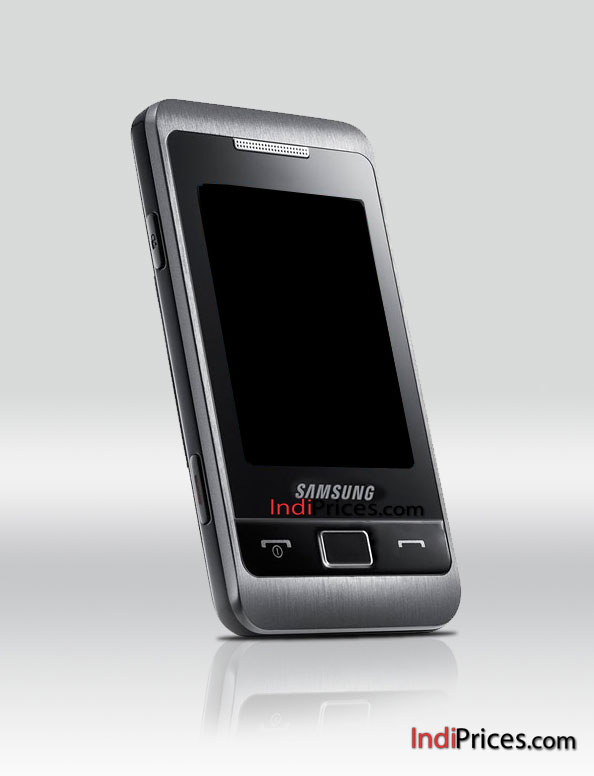
Samsung Champ 2

Premium Look, Premium Quality
Designed to impress by look, touch and performance, Samsung Champ 2 offers premium quality for mobile users. The large 2.4” QVGA full touch screen emphasizes the mobile’s sleek and chic look while showcasing the mobile’s contents beautifully. Compact for portability, the metallic chassis is cool and sophisticated.

Socializing Features

From instant messaging to social networking sites and email, Samsung Champ 2 has everything you need to stay in touch while on the go. ChatON and 5 different instant messaging severs including MSN, Yahoo and G-talk let you connect to all your friends. and native SNS offers seamless access to Facebook, and Twitter!
Great Multimedia Functionality
For the best in multimedia access, look no further than Samsung Champ 2! The home screen is extendable up to 7 pages, so it can hold your favourite applications. You can also choose from up to 13 different widgets for the services you need most. But that’s not all – this mobile comes equipped with a 2MP camera, MP3 player (with convenient 3.5mm ear jack) and FM radio!
Connectivity & Usability
Bluetooth 3.0 offers wireless connectivity to PCs and mobile peripherals
. USB 2.0 enables fast data transfers between devices and PCs
. microSD offers external memory capacity up to 16GB

The new iPad

The new iPad vs Samsung Galaxy Note 10.1

The new iPad is a serious gadget as far as Apple is concerned. The trouble is that Apple is always concerned that far, especially when it comes to Android. So, just because Tim Cook and his cohorts went up on stage to tell us in a string of superlatives that there has never been anything in the history of the universe as good as the iPad 3, doesn’t necessarily mean that we should believe them.

Take, for example, the Samsung Galaxy Note 10.1, which will be one of the best Android tablet experiences available when it arrives in the shops; how does that compare to the iPad 3? Is the Apple tablet really the best of the best for 2012 or has it not even managed to clear the first competitor? Take a look at Pocket-lint’s iPad 3 vs Samsung Galaxy Note 10.1 and find out.

Form Factor
With the frame of the next-gen iPad 3 not changing all that much from the iPad 2, that leaves the Samsung Galaxy Note 10.1 still very much in the driving seat as far as form factor goes. At nearly 100g lighter and a shade slimmer, it wins this round hands down. The only possible case that you could argue for the new iPad is in terms of the beauty of its industrial design and, yes, it is a looker. The thing is, so is the Samsung Galaxy Note 10.1.

Display
Samsung is no stranger to stretching the boundaries when it comes to display technology. It was, after all, Samsung that supplied the panels for the iPads of old. On top of that, there’s also the Super AMOLEDs of Samsung’s mobile phone range to consider and its expertise in the AV field. All the same, it’s the new iPad that takes the crown as far as tablet displays go right now. The Super PLS technology in the 10.1 makes for an amazing viewing angle but the iPad 3 cleans up in the pixel department. Not only is the resolution huge but, in terms of density on that slightly smaller iPad 3 screen, it’s also going to make for a crisper picture. Naturally, we expect Samsung to unveil something impressive of its own some time soon but, right now, it’s a big display win for the iPad 3.

Engine Room

There’s not a whole lot know about the details of the SoC that lies in the heart of the Samsung Galaxy Note 10.1. Its siblings in the Galaxy Tab family rocked a Tegra 2 system which was very much on a par with the Apple A5 of the iPad 2 but we can’t be sure that that’s the same unit as in the Note 10.1.  What we do know is that the Apple A5X in the iPad 3 is a quad-core graphics chip and, whatever the clock speed, that trumps the dual-core set up in the Note 10.1. It’s a definite win for the iPad 3.

Imaging

It’s not something that anyone was really expecting out of Cupertino, but Apple has put some serious work into revamping the optical abilities of the iPad. The iPad 3 is a veritable bottom kicker in this department, with a machine that’s as good at capturing stills as it is at shooting video. While the 720p capture was never really a problem, the jump up to a snapper with a resolution way beyond the old dreadful 0.7 megapixels, makes this gadget something that photographers can enjoy as much for catching the action as they can editing the results. We never had a problem with the Galaxy Note 10.1 in this department before. It seems now that Samsung has its work cut out.

Software

One could sit here and argue until the cows come home, nestle in the straw and have a bit of a stretch and sleep the entire night before coming to any kind of conclusion about which is better - Android or iOS. If you’re not already in the know, the nutshell version is that iOS is super smooth and super simple but a bit restrictive whereas Android is much more flexible, customisable and fun but just missing that touch of ease of use and app support. So, that given, we’re calling this round a tie but we do recommend having a play with both OSs if you’re not familiar with them. You’ll work out pretty quickly which one you prefer.

Storage

Samsung seems keen on expandable storage throughout its smartphone and tablet range and that’s no bad thing. While, for some, the advantage might be all about stuffing as many files as possible on to any one device at any one time, the real bonus comes when considering the cost. While the top end 64GB of storage on the iPad 3 costs a top-end price, you can get the same amount of potential file space on the Samsung Galaxy Note 10.1 by choosing the middle range 32GB version and picking up a far cheaper 32GB microSD card to make up the difference. Worth thinking about.

Connectivity

    With Wi-Fi, Bluetooth and 3G connectivity very much the standard trio these days, the only areas where the iPad 3 could really have caught up with the Samsung Galaxy Note 10.1 is in the speed of that cellular connectivity and that’s exactly what Apple has done. Waving around a 9.7-inch tablet for contactless payment isn’t particularly practical for those hoping for the inclusion of NFC technology, but LTE is something that will certainly be enjoyed by those living in the States and other countries with a 4G mobile infrastructure in place.

Battery

It may seem strange given the statistics provided but we’re handing this round to the Samsung Galaxy Note 10.1. Yes, Apple claims up to 10 hours of battery life per charge but we’d be immensely surprised if that included anything like as much as the 9 hours of video output that the Note 10.1 promises. Far more likely is that you’d be talking a few hours of audio here, some gaming there, a movie and bit of web browsing and that’s about it. Rendering solid HD for 10 hours straight sounds like far too much. Hence the words “up to” and the word “usage”.

Conclusion

Choosing the better tablet here, it’s hard not to hear one’s parents in one’s ear. The practical choice is the Samsung Galaxy Note 10.1. It wins a lot of rounds against the iPad 3. The trouble is that it’s the sexiest, raciest, more daring and, ultimately, most exciting battle that it loses. The iPad 3 is the hot rod here with a brilliant screen and a huge engine under the hood to make it purr like a wild cat. Throw in that beefed up camera and its near unbeatable. Tablets are nothing if not items of luxury to get excited about and, of the two, it’s the iPad 3 that really gets the heart pounding. And the Samsung S-pen stylus really doesn’t help add to that wow factor.

Samsung Galaxy Ace 2


 Samsung Galaxy Ace 2

Introduction:

The reason you should be very interested in the Samsung Galaxy Ace 2 is that it could turn out to be one of the best value-for-money Android offers this season.

While the original Ace was a very decent phone for its bucks last year, the Ace 2 is quite on the way to cover that ground this year as well. It has a decent size screen with good resolution, slightly underclocked yet dual-core processor, and 5MP cam with flash plus a front-facing camera.

Indeed you can't ask for much more from what will likely be a lower mid-range Android device this year. We  ran a prototype unit of the phone through its paces, so read on our preview for the initial impressions...

Design:

Nothing out of the ordinary can be said about the design. It is made with the usual for Samsung black plastic, with slightly patterned tapered back, and rounded corners.

You can compare the Samsung Galaxy Ace 2 with many other phones using our Size Visualization Tool.

The phone lies well in the hand, and is not overly thick or heavy. The power/lock button is comfortably placed on the right, directly under your thumb, facilitating one-handed operation.

This button, along with the volume rocker on the left, and the physical home key are easy to feel and with good feedback.

Finding the Killer Computer

Finding the Killer Computer
When it comes to computers, one size doesn’t fit all. You need a PC tailored to your needs, budget, and style. From power user to student and web surfer, Samsung’s outstanding line of laptops is designed with your needs in mind. Here’s a guide to finding one you’ll love.

Multimedia Maniac

Video editing and advanced photo manipulation take muscle. The key is high-grade graphics and a fast, powerful CPU under the hood. The Samsung RF711-S01UK is the most powerful computer in the RF series and the perfect multimedia machine, featuring:

Rounding out the package is a USB port that charges your phone or MP3 player even when the laptop is turned off.

Gaming Wizard

Gamers need a laptop with top-notch graphics and performance that can keep up with the heavy demands of modern video games. But style is important, too. The Samsung R780-JS03UK packs an Intel® Core™ i5 processor and assures you won’t be outclassed in the looks department by a rival. The Samsung R780 also features:

Road Warrior

Mobile executives need something that’s versatile and powerful, yet small enough to go anywhere. They need the processing power to zip through demanding applications and a battery that won’t quit before the work is done. Samsung’s svelte NS310-A01UK Netbook offers a bright, easy-to-read screen that measures 10.1-inches diagonally. But space-saving technology doesn’t mean compromised capability. The NS310-A01 offers plenty of power and numerous bonus features, including:

 Serious (But Stylish) Student

Today’s student needs a laptop that excels at everything from taking notes and doing research on the web to playing games and watching TV. And it has to be compact enough to fit in a backpack. The Samsung Q430-JS01UK (http://www.samsung.com/uk/consumer/pc-peripherals/notebook-computers/thin-and-light/NP-Q430-JS01UK/index.idx?pagetype=prd_detail) features a full-sized keyboard and a 14-inch, LED-backlit display wrapped in a stylish, aluminium case. It comes packed with features, including:

 Samsung’s fast-start feature gets you up and running in just three seconds—perfect when you’re late to class.

The Family That Plays Together

No family room is complete without a computer, but a laptop that’s right for everyone in the family is a stretch. A family PC has to shine at the basics—word processing, web browsing, and email—and still offer a great experience when the entire clan sits down to watch a movie or play a game. The Samsung RF511-S01UK (http://www.samsung.com/uk/consumer/pc-peripherals/notebook-computers/performance/NP-RF511-S01UK/index.idx?pagetype=prd_detail) offers a host of versatile features, including:
  a chargeable USB port that does double duty, connecting devices or charging mobile phones and MP3 players, even when the computer is turned off .


Samsung loses appeal against Apple's Galaxy Tab ban

Samsung loses appeal against Apple's Galaxy Tab ban


Apple is set to win a US ban on sales of the Samsung Galaxy Tab tablet computer after a judge denied an appeal by the Korean firm.


Samsung had appealed against the injunction, issued by Judge Lucy Koh last week, asking for it to be put on hold. Judge Koh has denied the request.


The judge also issued an injunction last week banning sales of the Galaxy Nexus smartphone, against which Samsung also appealed. The judge has yet to rule on that request.


Samsung provided seven grounds for its appeal, including that Apple cannot prove that its market share is being damaged.


A Samsung spokesman said the company was "disappointed" with the decision. "We believe today’s ruling will ultimately reduce the availability of superior technological features to consumers in the United States," he said.


Samsung's Galaxy tablets, powered by Google's Android operating system, are considered by many industry experts to be the main rival to the market-leading iPad. The ruling comes with Samsung facing impending competition from rivals. Both Microsoft and Google are about to release their own tablets.


Koh had previously denied Apple's bid for an injunction on the tablet and multiple Galaxy smartphones. However, a federal appeals court instructed Koh to reconsider Apple's request on the tablet.


"Although Samsung has a right to compete, it does not have a right to compete unfairly, by flooding the market with infringing products," Koh wrote, directing that her order become effective once Apple posts a $2.6m bond to protect against damages suffered by Samsung if the injunction is later found to have been wrong.


If Samsung fails to get the injunction lifted in the district court, it can take its case to the federal appeals court in Washington DC, which has jurisdiction over intellectual property cases


Samsung © 2012 | Designed by Cheap TVS, in collaboration with Vegan Breakfast, Royalty Free Images and Live Cricket Score